
Here are the steps you need to follow to start a new season in the Gesvatec labelling software.
Instructions
- Run Gesvatec and enter the username and password to access the last season.
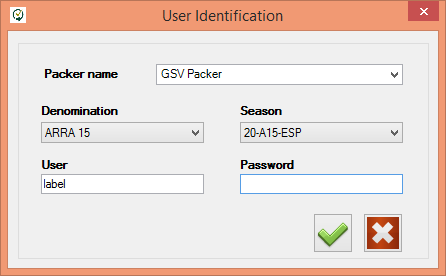
Descripcion de la imagen
Captura del dialogo 'User Identification' del software Gesvatec. Campos: Packer name: GSV Packer (desplegable), Denomination: ARRA 15 (desplegable), Season: 20-A15-ESP (desplegable), User: label, Password (vacio). Botones: check verde (aceptar) y X roja (cancelar).
If a warning message appears, pointing out that you are not accessing the current season, just accept it to continue: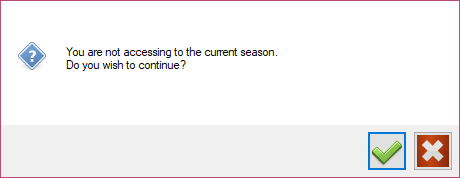
Descripcion de la imagen
Dialogo de aviso: 'You are not accessing to the current season. Do you wish to continue?' con icono de pregunta. Botones: check verde (si) y X roja (no).
- Go to the Data download screen and click the
 button to download the new season information.
Descripcion de la imagen
Icono de descarga (flecha hacia abajo en un cuadrado azul). Boton de descarga de datos.
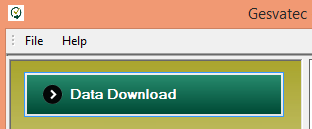
Descripcion de la imagen
Captura parcial del software Gesvatec mostrando la barra de menu (File, Help) y el boton 'Data Download' resaltado en verde oscuro.
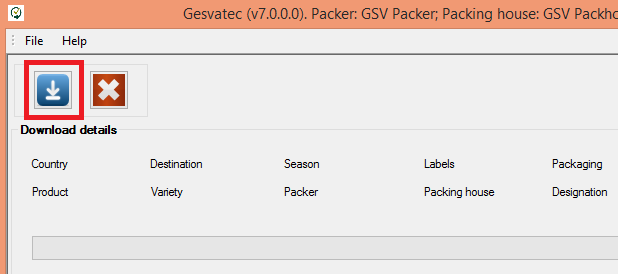
Descripcion de la imagen
Captura del software Gesvatec (v7.0.0.0) Packer: GSV Packer. Barra de herramientas con iconos de descarga y cancelar. Seccion 'Download details' con columnas: Country, Destination, Season, Labels, Packaging, Product, Variety, Packer, Packing house, Designation. El boton de descarga esta resaltado con un recuadro rojo.
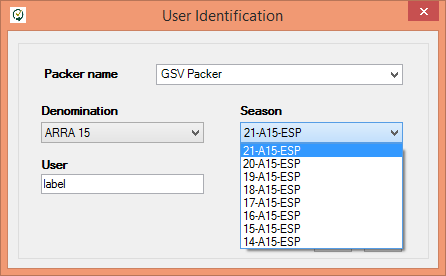
- Once the data download is finished, close the software and open it again. In the login screen, in the Season drop-down list, you will be able to select the new season:
Descripcion de la imagen
Captura del dialogo 'User Identification' con el desplegable de Season abierto mostrando las temporadas disponibles: 21-A15-ESP (seleccionada), 20-A15-ESP, 19-A15-ESP, 18-A15-ESP, 17-A15-ESP, 16-A15-ESP, 15-A15-ESP, 14-A15-ESP. Denomination: ARRA 15, Packer: GSV Packer, User: label.
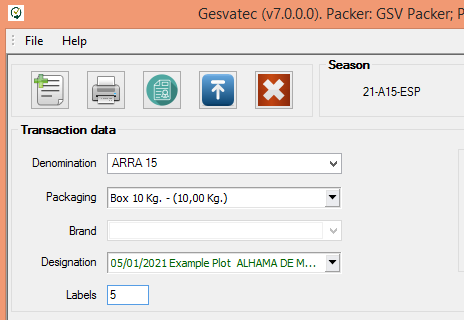
- After logging in to the new season, go to the Transactions screen and print test labels using the Example Plot, to check if the printer is working correctly. If the test labels are OK, everything is ready to start the season.
Descripcion de la imagen
Captura de la pantalla principal del software Gesvatec (v7.0.0.0). Barra de herramientas con iconos. Seccion 'Transaction data' con campos: Denomination: ARRA 15 (desplegable), Packaging: Box 10 Kg. - (10,00 Kg.) (desplegable), Brand (vacio), Designation: 05/01/2021 Example Plot ALHAMA DE M... (desplegable), Labels: 5. Season: 21-A15-ESP visible en esquina superior derecha.