
The packer can create, at any time, the packagings they need to use in the Gesvatec labeling software.
Instructions
- Go to the Gesvatec website and log in to the private area with your credentials.
- In the left navigation menu, go to Labeling → Packaging.
- Click the button

Descripcion de la imagen
Icono de simbolo '+' (mas) blanco sobre fondo verde oscuro. Boton para crear nueva confeccion/packaging.
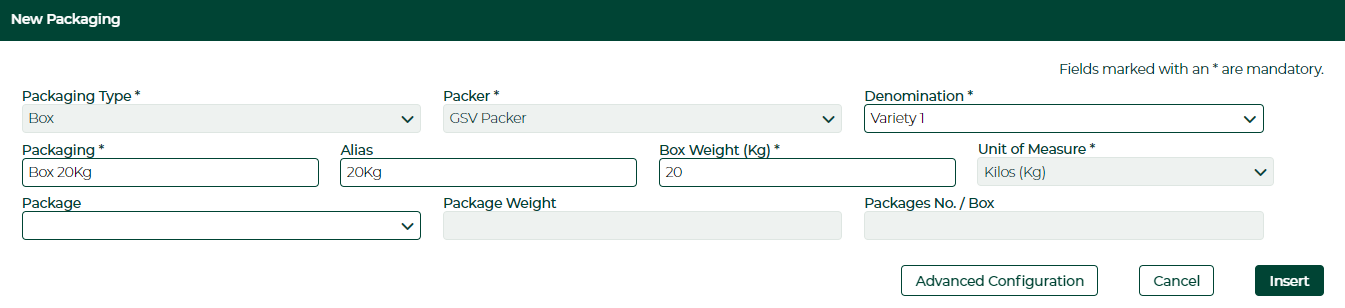
- In the New Packaging section, in the Packaging text box, enter the description of the packaging. Optionally, you can also enter an Alias. The description entered in the New Packaging text box will be displayed in the labeling software and the website. The Alias will be printed on the labels. Important: The text printed on the labels must describe the weight of the packaging. For instance, 5Kg Box or 10x500g:
Descripcion de la imagen
Captura del formulario 'New Packaging'. Campos: Packaging Type: Box, Packer: GSV Packer, Denomination: Variety 1, Packaging: Box 20Kg, Alias: 20Kg, Box Weight (Kg): 20, Unit of Measure: Kilos (Kg), Package (desplegable vacio), Package Weight (vacio), Packages No./Box (vacio). Botones: Advanced Configuration, Cancel, Insert.
- In the Box Weight (Kg.) text box, enter the weight of the packaging in kilograms:

Descripcion de la imagen
Captura parcial del campo 'Box Weight (Kg)' con valor '20' introducido.
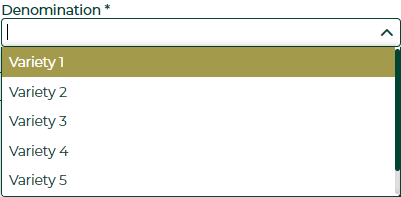
- In the Packages section, in the Varieties drop-down list, check the box of the variety you are going to use this packaging for:
Descripcion de la imagen
Captura del desplegable 'Denomination' abierto mostrando opciones: Variety 1 (seleccionada/resaltada en amarillo), Variety 2, Variety 3, Variety 4, Variety 5.
-
Click the
 button to create the packaging.
Descripcion de la imagen
Boton verde oscuro con texto 'Insert' en blanco.
Variety mix
You can create packagings containing packages that mix several varieties, or packagings containing packages of different weights. To see examples on how to create these kinds of packagings, please check the following article:
Please note...
- After creating the packaging, perform a Data Download to start using it in the software.
- You need to create at least one packaging for each of your varieties. If there are no packagings for a certain variety, you will not be able to print labels for said variety.