
In this guide we are going to show six examples that explain different packaging configurations, depending on the packer's needs. The examples are ordered from the least difficult to the most difficult.
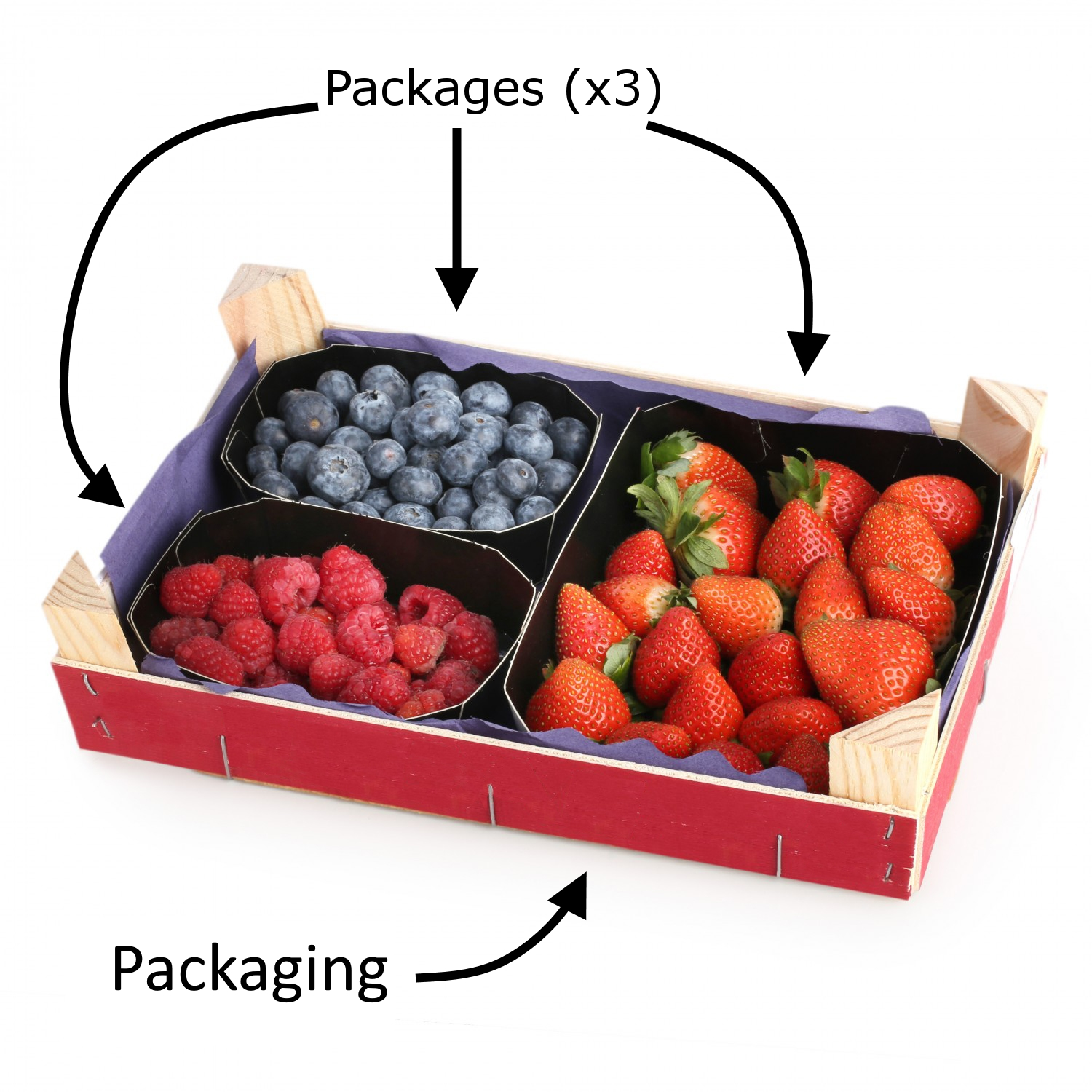
To avoid confusion of nomenclature on each component of the packaging, the following image is shown:
Descripcion de la imagen
Imagen ilustrativa de una caja de fruta (confeccion). Muestra una caja roja de madera con tres envases dentro: frambuesas, arandanos y fresas. Texto: 'Envase (x3)' con flechas senalando los tres compartimentos individuales. 'Confeccion' con flecha senalando la caja completa.
Requirements
- Except for case 1, in all the cases explained below you'll need to have previously created the packages that will be contained in the packaging. This can be done in the Labeling → Packaging section of the private area of the website.
Note: Packages can be reused for different packaging and varieties.
Case 1: Packaging of 1 package and 1 variety
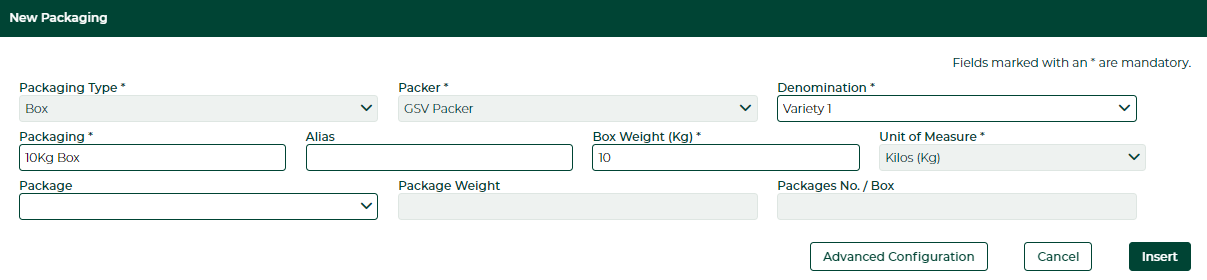
If you want to create a packaging without detailing the configuration of your packages, it can be created as shown below. This solution is appropriate if the packaging consists of a single variety.
In this case, we have a 10Kg packaging containing one 10Kg package of the Variety 1.
- Packaging 10Kg
- Package 10Kg
- Variety 1 - 10Kg
- Package 10Kg
Descripcion de la imagen
Captura de pantalla del formulario 'New Packaging' del software Gesvatec. Campos visibles: Packaging Type: Box, Packer: GSV Packer, Denomination: Variety 1, Packaging: 10Kg Box, Alias (vacio), Box Weight (Kg): 10, Unit of Measure: Kilos (Kg), Package (desplegable vacio), Package Weight (vacio), Packages No. / Box (vacio). Botones: Advanced Configuration, Cancel, Insert.
Finally, click on Insert.
Case 2: Packaging of 2 packages of 1 variety
If you want to create a packaging detailing the configuration of its packages, it can be done as follows. In this case, the packaging contains a single variety.
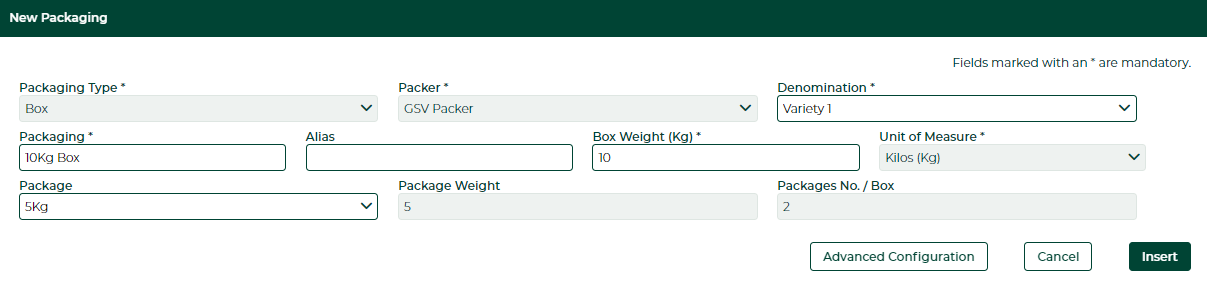
We have a 10Kg packaging that contains two 5Kg packages, of the variety Variety 1.
- Packaging 10Kg
- Package 5Kg (x2)
- Variety 1 - 5Kg
- Package 5Kg (x2)
Descripcion de la imagen
Captura del formulario 'New Packaging' con Package seleccionado. Campos: Packaging Type: Box, Packer: GSV Packer, Denomination: Variety 1, Packaging: 10Kg Box, Box Weight: 10, Unit of Measure: Kilos (Kg), Package: 5Kg, Package Weight: 5, Packages No. / Box: 2. Botones: Advanced Configuration, Cancel, Insert.
This time in the field Package we will have to put a 5Kg package previously created in the Labelling > Packages window. When we put the weight of the packaging in the field Box Weight and the package, we will be able to see how the fields of both Box Weight and Packages No. / Box are automatically updated.
Finally, click on Insert.
Case 3: Packaging of 2 different packages of 1 variety
For a packaging containing packages of the same variety with different weights, the configuration can be done as shown below.
In this case there is a 10Kg packaging composed of three packages (one 5Kg package and two 2.5Kg packages), all containing Variety 1.
- Packaging 10Kg
- Package 5Kg
- Variety 1 - 5Kg
- Package 2.5Kg (x2)
- Variety1 - 2,5Kg
- Package 5Kg
Descripcion de la imagen
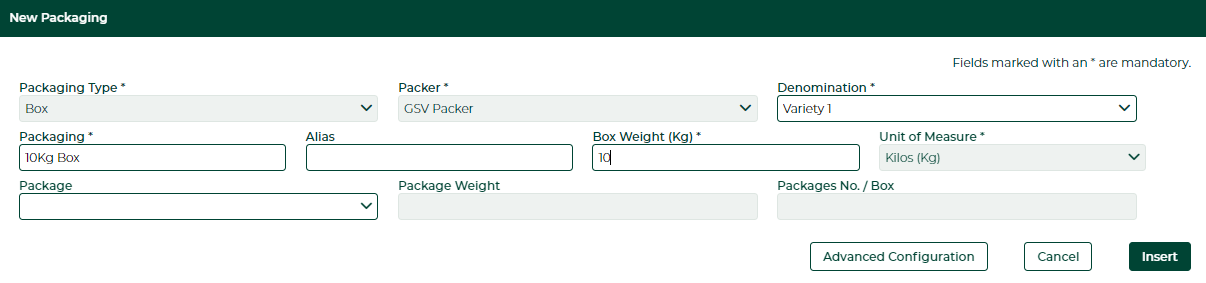
Captura del formulario 'New Packaging' identico al ejemplo 2. Campos: Packaging Type: Box, Packer: GSV Packer, Denomination: Variety 1, Packaging: 10Kg Box, Box Weight: 10, Unit of Measure: Kilos (Kg), Package (desplegable vacio). Botones: Advanced Configuration, Cancel, Insert.
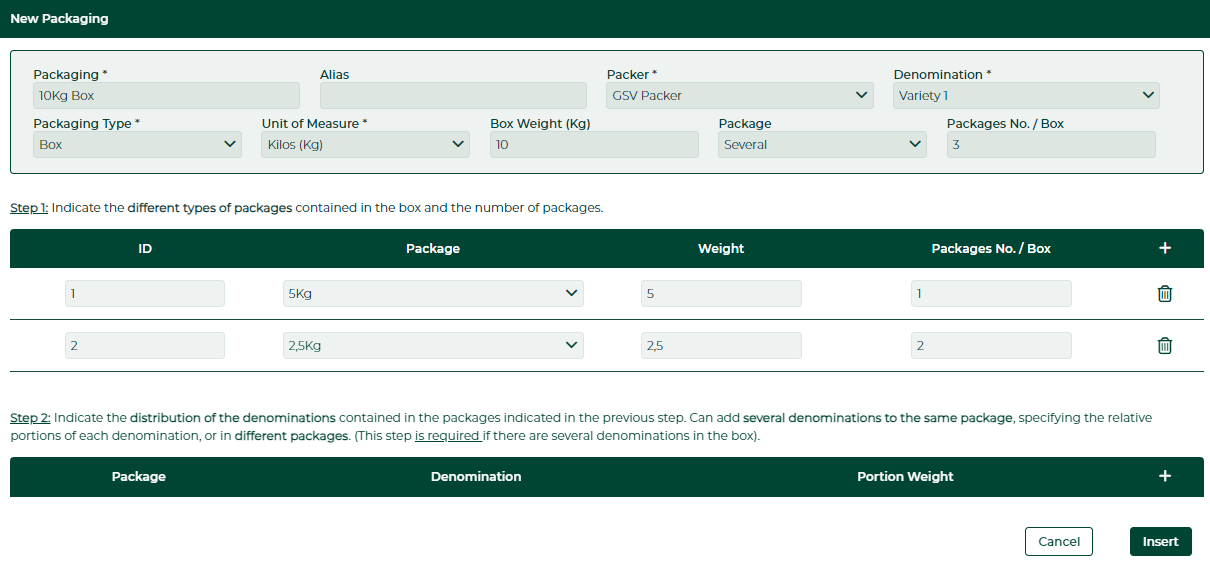
We will click on Advanced Configuration to enter the different packages of our packaging.
Descripcion de la imagen
Captura del formulario 'New Packaging' con configuracion avanzada. Campos superiores: Packaging: 10Kg Box, Packer: GSV Packer, Denomination: Variety 1, Packaging Type: Box, Unit of Measure: Kilos (Kg), Box Weight: 10, Package: Several, Packages No./Box: 3. Step 1: tabla con columnas ID, Package, Weight, Packages No./Box. Fila 1: ID 1, Package 5Kg, Weight 5, Packages 1. Fila 2: ID 2, Package 2,5Kg, Weight 2,5, Packages 2. Step 2: Indica la distribucion de denominaciones. Tabla con columnas Package, Denomination, Portion Weight (vacia). Botones: Cancel, Insert.
The configuration that we will have to do is the one shown in the previous image, the packages are added with the button  on the right. In step 2 you don't have to do anything as it is only intended for packaging with more than one denomination.
Descripcion de la imagen
Icono de boton '+' (simbolo mas) sobre fondo verde oscuro. Se usa para anadir nuevos elementos en el formulario.
Case 4: Packaging of 2 packages with the same weight and 2 varieties
If you want to label packaging containing packages with the same weight but different varieties (each package containing a single variety), you have to define the packaging as displayed below.
In this case, there is a 10Kg packaging with two 5Kg packages, one of them containing the variety Variety 1 and another one containing the variety Variety 2.
- Packaging 10Kg
- Package 5Kg
- Variety 1 - 5Kg
- Package 5Kg
- Variety 2 - 5Kg
- Package 5Kg
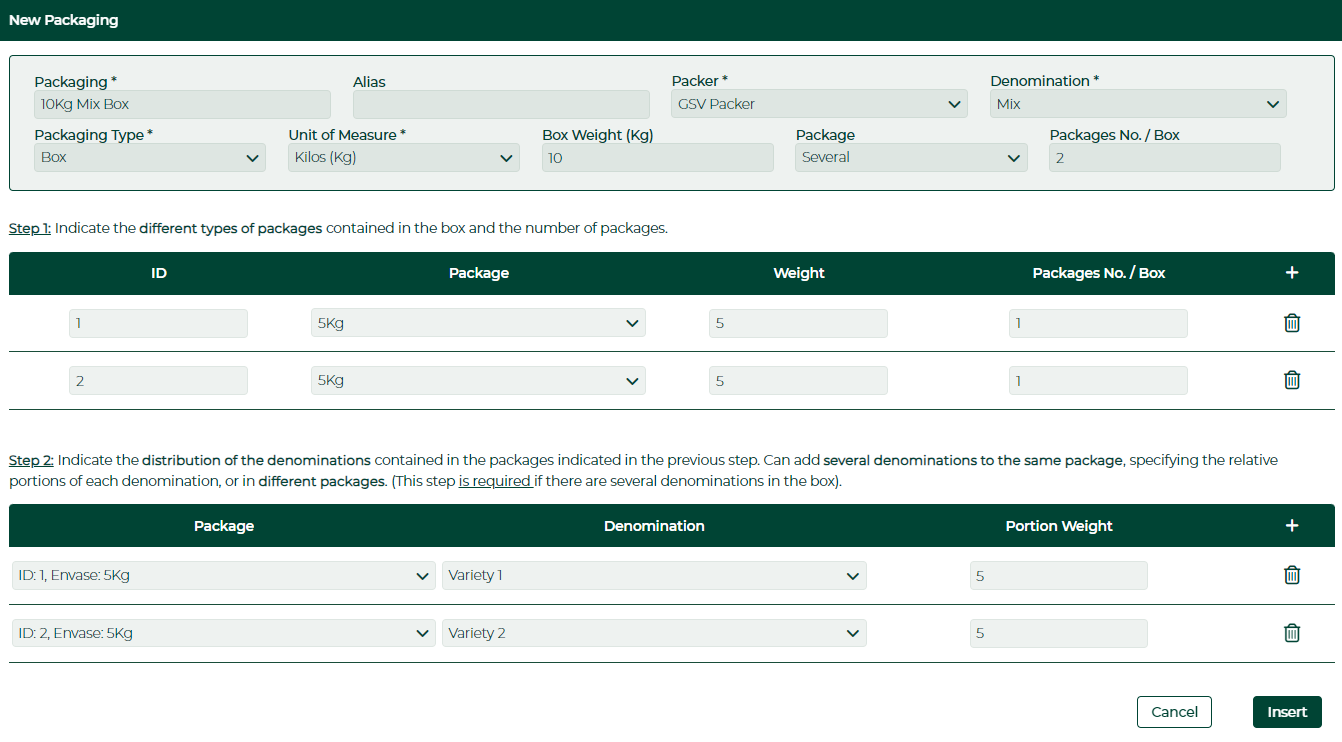
For a packaging of more than one variety, select the Mix option in the Denomination field and enter the advanced configuration after entering the name and weight of the packaging.
Descripcion de la imagen
Captura del formulario 'New Packaging' con configuracion avanzada y Step 2 completado. Campos: Packaging: 10Kg Box, Packer: GSV Packer, Denomination: Variety 1, Package: Several, Packages No./Box: 3. Step 1: Fila 1: 5Kg, Weight 5, 1 envase. Fila 2: 5Kg, Weight 5, 1 envase. Step 2: ID 1 Envase 5Kg - Variety 1 - Peso Porcion 5. ID 2 Envase 5Kg - Variety 2 - Peso Porcion 5. Botones: Cancel, Insert.
Case 5: Packaging with 1 package and 2 varieties
If the packaging contains a single package mixing several varieties, you can set the configuration of your packages as follows.
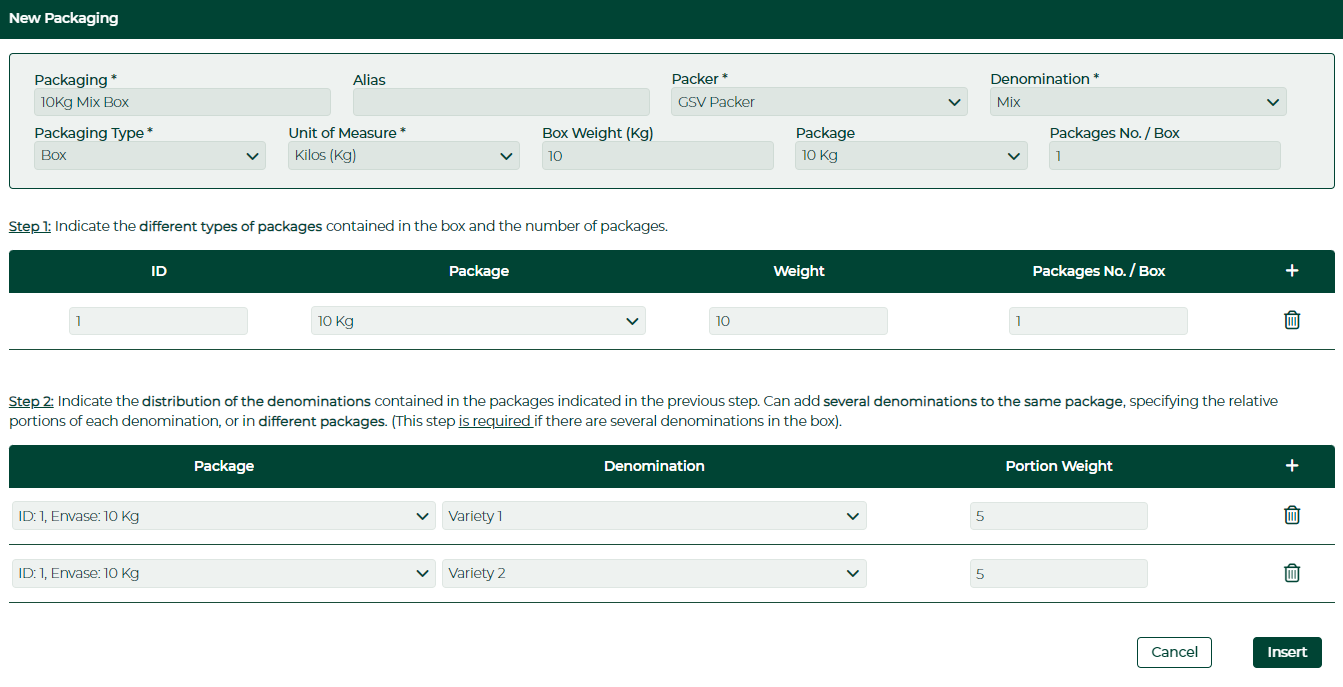
In this case, there is a 10Kg packaging with a 10Kg package, containing 5Kg of Variety 1 and 5Kg of Variety 2. The total weight is 5Kg for each variety.
- Packaging 10Kg
- Package 10Kg
- Variety 1 - 5Kg
- Variety 2 - 5Kg
- Package 10Kg
Descripcion de la imagen
Captura del formulario 'New Packaging' - ejemplo con un solo envase 10Kg. Step 1: ID 1, Package 10Kg, Weight 10, Packages 1. Step 2: ID 1 Envase 10Kg - Variety 1 - Peso 5. ID 1 Envase 10Kg - Variety 2 - Peso 5. Botones: Cancel, Insert.
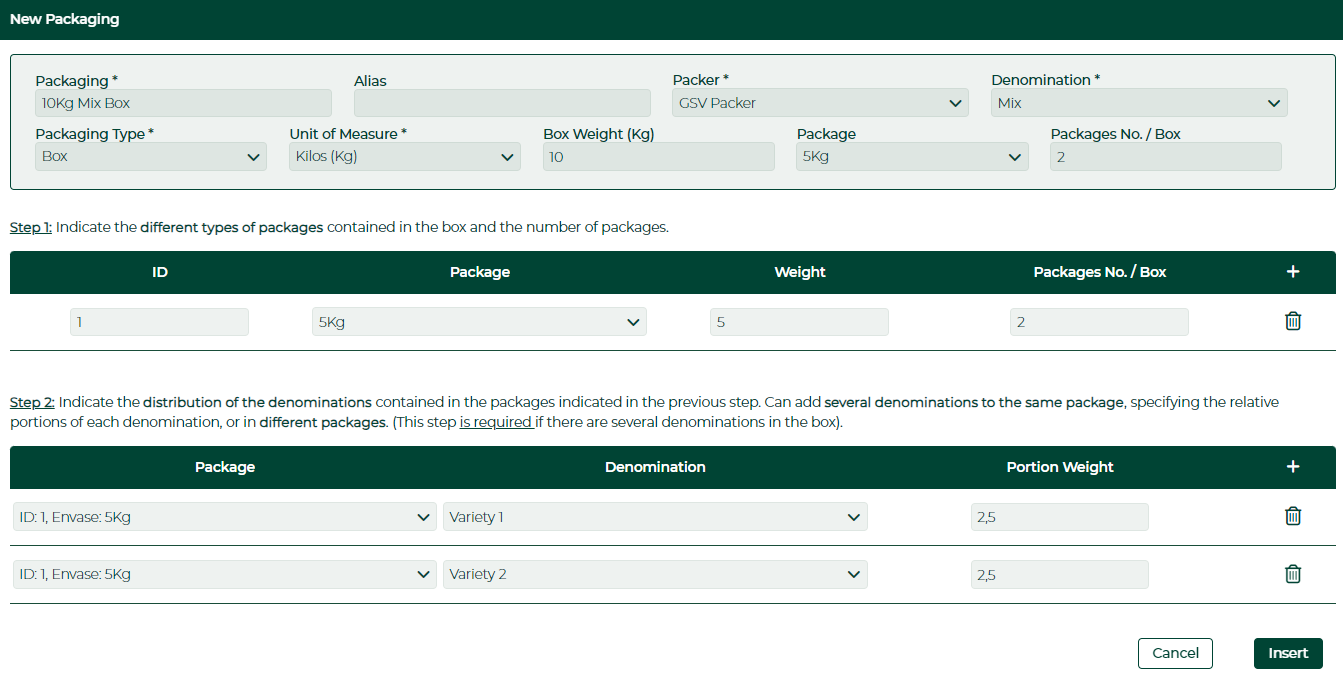
In a similar example with two packages instead of one, we have a 10Kg packaging with two 5Kg packages. Each package contains 2.5Kg of Variety 1 and 2.5Kg of Variety 2, each variety weighing in total 5Kg.
- Packaging 10Kg
- Package 5Kg (x2)
- Variety 1 - 2.5Kg
- Variety 2 - 2.5Kg
- Package 5Kg (x2)
Descripcion de la imagen
Captura del formulario 'New Packaging' - ejemplo con envase 5Kg x2. Step 1: ID 1, Package 5Kg, Weight 5, Packages 2. Step 2: ID 1 Envase 5Kg - Variety 1 - Peso 2,5. ID 1 Envase 5Kg - Variety 2 - Peso 2,5. Botones: Cancel, Insert.
Case 6: Packaging with 3 packages and 2 varieties (two of the packages with the same weight and different variety distributions)
In case the requirement is to label a packaging with several varieties and several packages, mixing the varieties in some of its packages, it is possible to detail the packaging as displayed below.
In this case you have a 10Kg packaging containing three packages (one 5Kg package and two 2.5Kg packages). The 5Kg package (identified as Package Type 1) is composed of 2.5Kg of Variety 1 and 2.5Kg of Variety 2. One of the 2.5Kg packages (identified as Package Type 2) is composed of 1.5Kg of Variety 1 and 1Kg of Variety 2. And lastly, the other 2.5Kg package (identified as Package Type 3) is composed entirely of Variety 2. The total weight of Variety 1 is 4Kg and the total weight of Variety 2 is 6Kg.
- Packaging 10Kg
- Package 5Kg
- Variety 1 - 2.5Kg
- Variety 2 - 2.5Kg
- Package 2.5Kg
- Variety 1 - 1.5Kg
- Variety 2 - 1Kg
- Package 2.5Kg
- Variety 1 - 2.5Kg
- Package 5Kg
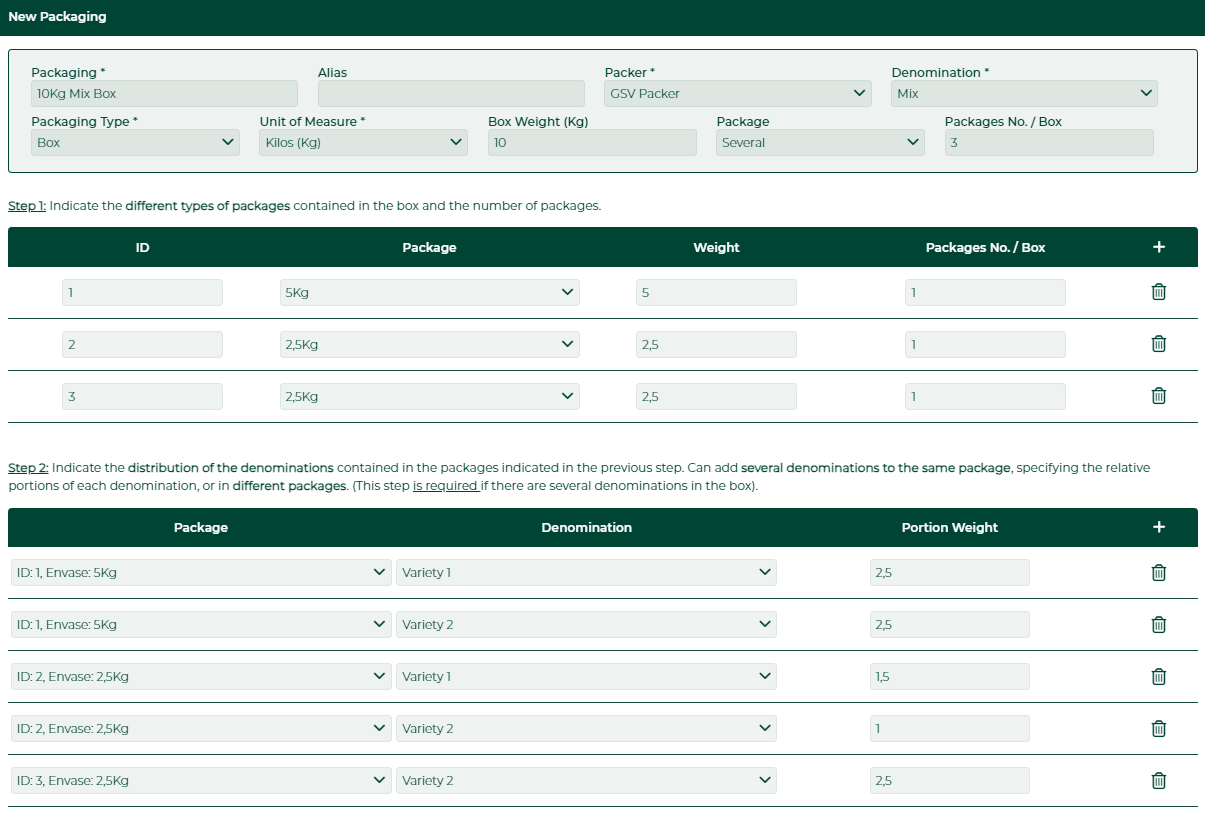
Descripcion de la imagen
Captura del formulario 'New Packaging' - ejemplo complejo con 3 envases. Step 1: ID 1 5Kg peso 5 x1, ID 2 2,5Kg peso 2,5 x1, ID 3 2,5Kg peso 2,5 x1. Step 2: ID 1 Envase 5Kg Variety 1 peso 2,5. ID 1 Envase 5Kg Variety 2 peso 2,5. ID 2 Envase 2,5Kg Variety 1 peso 1,5. ID 2 Envase 2,5Kg Variety 2 peso 1. ID 3 Envase 2,5Kg Variety 2 peso 2,5.