
If the printer is configured correctly, the texts on the labels should be properly aligned without any additional configuration. If not, we advise checking the following configurations:
Printer sensor
The texts may appear shifted if the printer sensor is not positioned correctly. Check that the printer sensor (the red light) is positioned right at the center of the Gesvatec label. If needed, move the sensor to the left or right until it's placed at the center:
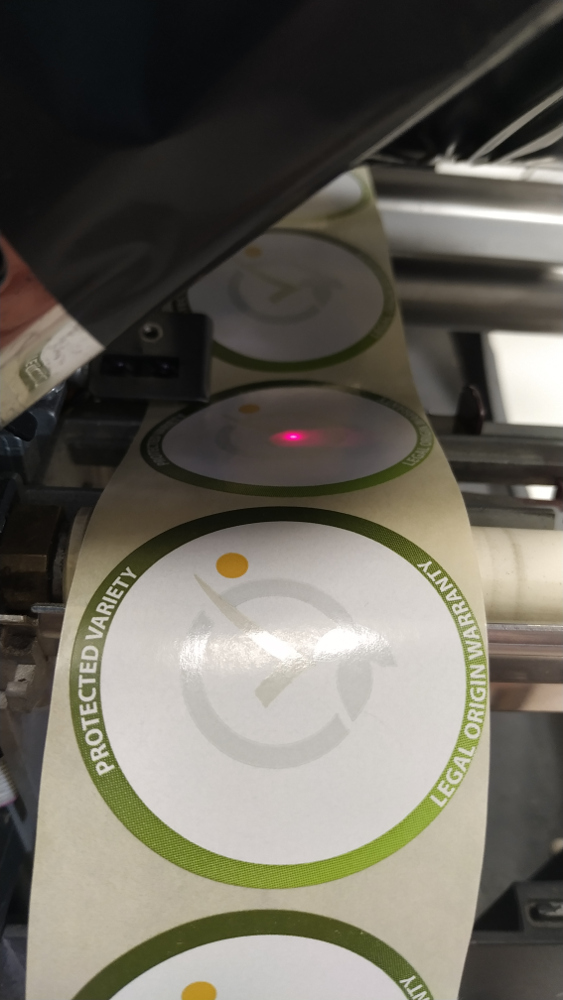
Descripcion de la imagen
Fotografia de etiquetas Gesvatec siendo impresas en una impresora termica. Se ven etiquetas circulares con el texto 'PROTECTED VARIETY' y 'LEGAL ORIGIN WARRANTY' con el logo de Gesvatec en el centro, y un sensor laser rojo de la impresora detectando las etiquetas.
If the labels are not round (such as the ClemenGold labels), make sure the printer sensor is placed right where the gap between the labels is smaller:
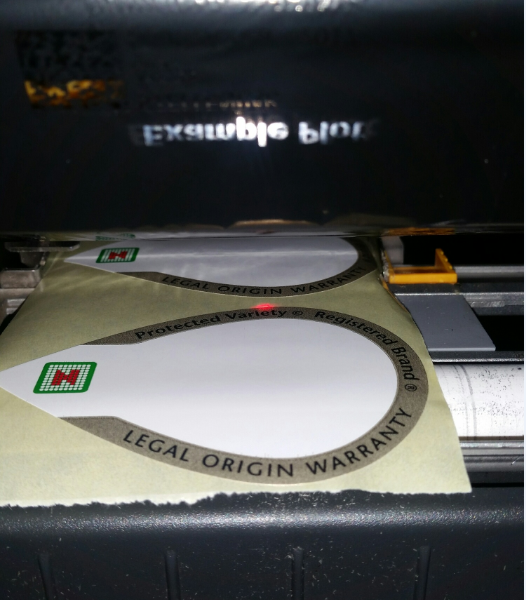
Descripcion de la imagen
Fotografia de una impresora termica imprimiendo etiquetas Gesvatec. Vista desde arriba mostrando el rollo de etiquetas circulares con texto 'LEGAL ORIGIN WARRANTY' y 'PROTECTED VARIETY' saliendo de la impresora. Se ve tambien texto invertido 'print example' en la parte superior.
Calibrating the printer
If the previous step did not solve the problem, perform a printer calibration to ensure the size of the labels is properly recognized. The calibration process varies depending on the printer brand and model; please check the printer manual to know the exact steps.