This quick guide offers brief instructions on how to install the Gesvatec labeling software. For detailed step-by-step instructions, please contact our Gesvate Support Team.
Descripcion de la imagen
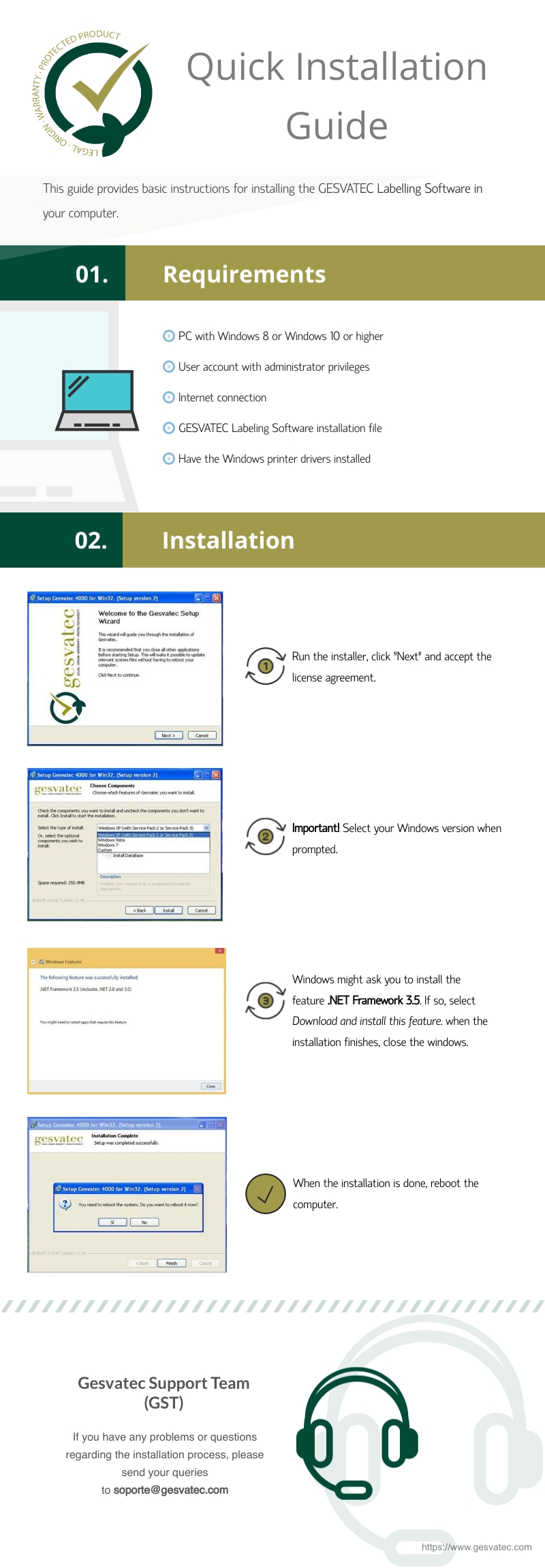
Infografia 'Quick Installation Guide' de Gesvatec Labeling Software. Logo Gesvatec (Protected Product / Legal Origin Warranty). Seccion 01 Requirements: PC con Windows 8 o Windows 10 o superior, cuenta de administrador, conexion a internet, fichero de instalacion del software, drivers de impresora instalados. Seccion 02 Installation: Paso 1 ejecutar instalador, click Next y aceptar licencia. Paso 2 (Important!) seleccionar version de Windows. Paso 3 Windows puede pedir instalar .NET Framework 3.5 - seleccionar Download and install. Paso 4 al terminar, reiniciar el equipo. Pie: Gesvatec Support Team (GST), soporte@gesvatec.com, https://www.gesvatec.com.